Uncover Your Organization's Shadow IT
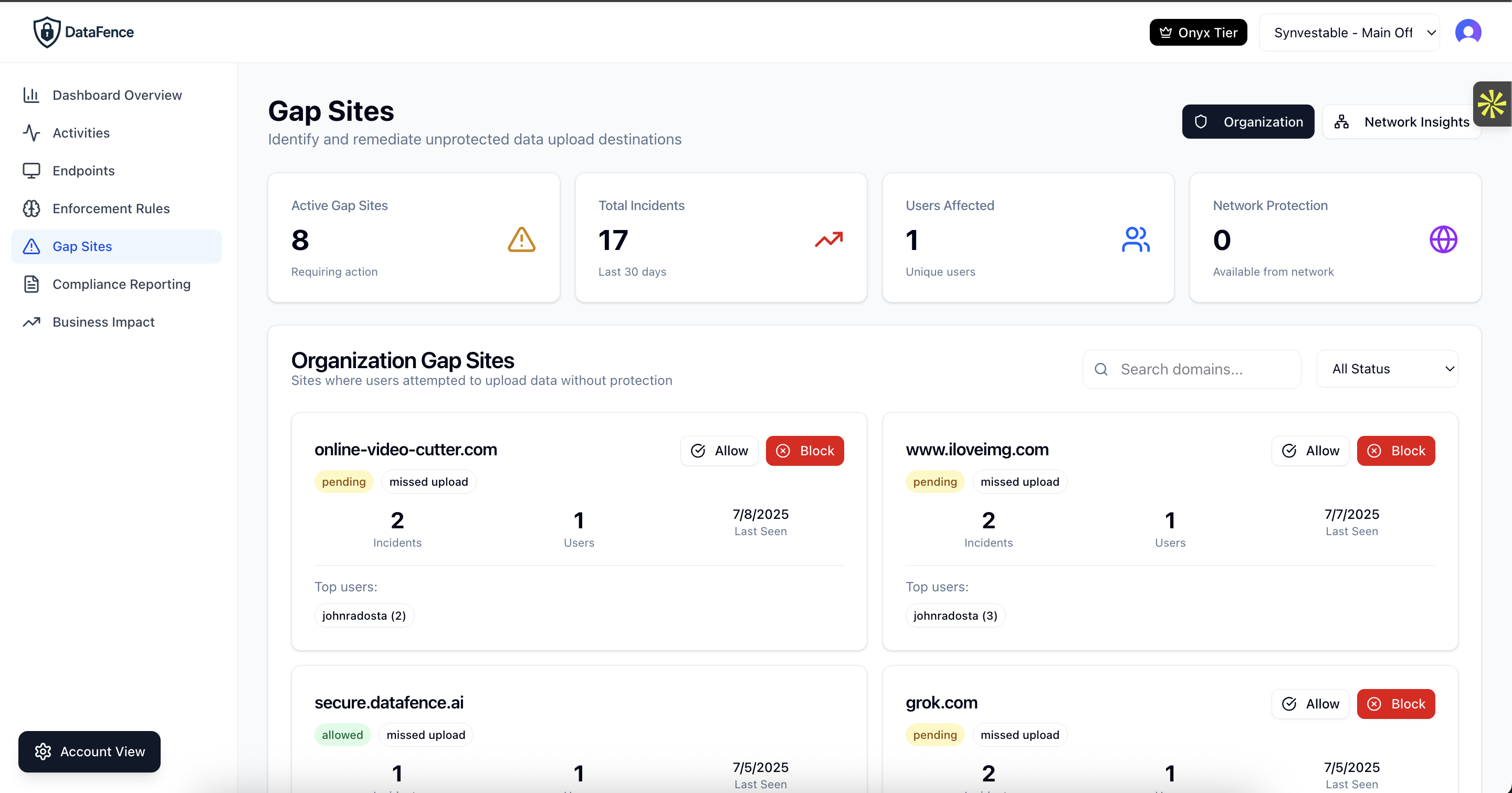
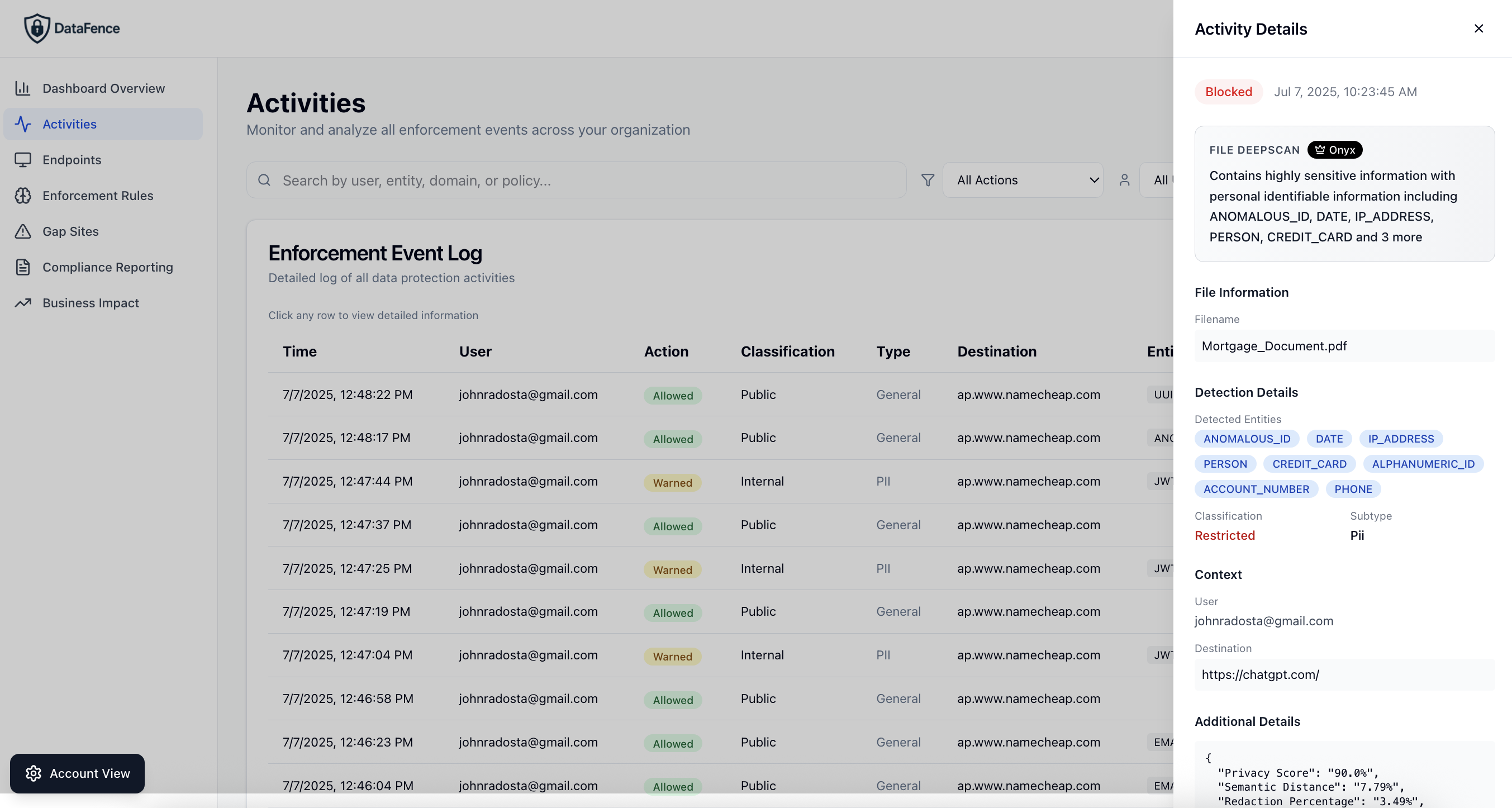
DataFence automatically discovers and catalogs every cloud application your employees use, giving you unprecedented visibility into potential security risks.
Automatic Application Discovery
Our intelligent discovery engine continuously monitors user activity to identify cloud applications and services being used across your organization:
- Cloud storage services (Dropbox, Google Drive, OneDrive)
- Communication platforms (Slack, Discord, Teams)
- AI tools (ChatGPT, Claude, Midjourney)
- Development tools (GitHub, GitLab, CodePen)
- Analytics and productivity apps
Risk Assessment & Scoring
Each discovered application is automatically assessed for security risks based on multiple factors:
- Security posture: Encryption, authentication methods, compliance certifications
- Data exposure: Types of data being shared or stored
- User adoption: Number of users and frequency of use
- Compliance impact: Regulatory implications
Shadow IT Discovery Features
Gap Reports
Identify applications where data is flowing but no security policies exist. Prioritize which apps need immediate attention.
Network Intelligence
Leverage crowdsourced insights from the DataFence network to understand emerging shadow IT trends and risks.
User Analytics
See which departments and users are adopting unsanctioned apps. Understand usage patterns and business needs.
Automated Blocking
Instantly block high-risk applications or set policies to warn users before accessing unsanctioned services.
Sanctioning Workflow
Streamline the process of evaluating and approving cloud applications with built-in assessment workflows.
Executive Reporting
Generate board-ready reports showing shadow IT risks, trends, and remediation progress over time.
Why Shadow IT Discovery Matters
Reduce Data Breach Risk
Unknown applications represent unknown risks. By discovering shadow IT, you can prevent data breaches before they happen.
Ensure Compliance
Meet regulatory requirements by maintaining a complete inventory of where sensitive data is being processed and stored.
Optimize IT Spend
Discover duplicate services and consolidate to approved alternatives, reducing costs and complexity.
Enable Innovation Safely
Understand what tools employees need and provide secure alternatives that meet both business and security requirements.
Frequently Asked Questions About Shadow IT Discovery
What is shadow IT and why is it a security risk?
Shadow IT refers to unauthorized cloud applications, services, and software that employees use without IT department approval or knowledge. It's a major security risk because IT teams can't protect data they don't know exists. Shadow IT creates vulnerabilities including unencrypted data storage, lack of access controls, compliance violations, and potential data breaches. Studies show 80% of employees use unauthorized SaaS applications at work, exposing organizations to risks IT can't see or manage.
How do shadow IT discovery tools work?
Shadow IT discovery tools like DataFence work by monitoring user browser activity in real-time to identify every cloud application and web service being accessed. Our browser extension tracks file uploads, form submissions, and API calls to detect unauthorized apps including cloud storage (Dropbox, Google Drive), collaboration tools (Slack, Discord), AI services (ChatGPT, Claude), and development platforms (GitHub, GitLab). The system catalogs each app, assesses its security risk, and generates reports showing where data is flowing outside approved channels.
What is shadow AI and how does it differ from traditional shadow IT?
Shadow AI is the unauthorized use of artificial intelligence tools and services by employees, representing the newest evolution of shadow IT. While traditional shadow IT involved file storage and collaboration apps, shadow AI includes tools like ChatGPT, Claude, Midjourney, GitHub Copilot, and hundreds of specialized AI services. Shadow AI is more dangerous because: (1) data entered into AI models may be used for training permanently, (2) AI can infer sensitive patterns from seemingly innocent data, (3) output may contain proprietary information, and (4) employees often paste entire documents, code repositories, or customer data into AI prompts without realizing the risk.
How can shadow IT discovery tools identify unsanctioned applications?
Shadow IT discovery tools identify unsanctioned applications by continuously monitoring all web traffic from employee endpoints. DataFence's browser-based approach tracks: (1) Domain names and URLs accessed, (2) File upload destinations, (3) Form submission endpoints, (4) API calls and data transfers, (5) Authentication flows to cloud services. The system compares detected applications against your approved software list, automatically flagging unauthorized tools. It then provides risk scores based on the application's security posture, data handling practices, compliance certifications, and how employees are using it.
What are the biggest shadow IT risks for organizations?
The biggest shadow IT risks include: (1) Data breaches from unencrypted or poorly secured cloud services, (2) Compliance violations when sensitive data (PII, PHI, financial) is processed by unauthorized systems, (3) Intellectual property theft when proprietary code or trade secrets are uploaded to public services, (4) Account takeovers from weak authentication or credential reuse, (5) Ransomware and malware from unvetted applications, (6) Vendor lock-in and data loss when employees store critical business data in personal accounts, (7) Audit failures from incomplete data inventory. The average cost of a shadow IT-related breach is $4.2M, with detection times averaging 287 days.
How quickly can shadow IT discovery tools detect unauthorized apps?
DataFence shadow IT discovery tools detect unauthorized applications in real-time, the moment an employee first accesses them. Unlike periodic scans or log analysis that might take days or weeks to identify shadow IT, browser-based detection captures application usage instantly. Within minutes of an employee uploading a file to Dropbox, submitting data to an unauthorized form, or accessing a new AI tool, IT administrators receive alerts and can review the activity. The system maintains a continuously updated inventory of all discovered applications, showing usage trends, risk levels, and which employees are using each service.
Can shadow IT discovery prevent data breaches?
Yes, shadow IT discovery can prevent data breaches by providing visibility and control before sensitive data leaves your organization. DataFence shadow IT discovery tools not only identify unauthorized applications but also enable immediate action: blocking high-risk apps, warning users before data upload, allowing approved alternatives, and enforcing policies in real-time. By discovering shadow IT early, organizations can remediate risks before breaches occur. For example, if employees are using an unapproved cloud storage service, you can identify it, assess the risk, migrate data to an approved alternative, and block future access—all before a breach happens.
What shadow IT discovery tools features should I look for?
Essential shadow IT discovery tools features include: (1) Real-time detection without network infrastructure changes, (2) Comprehensive application coverage (cloud storage, collaboration, AI, development tools), (3) Risk assessment and scoring for each discovered app, (4) User and department analytics showing adoption patterns, (5) Gap reports identifying policy coverage holes, (6) Automated blocking or warning capabilities, (7) Network intelligence leveraging crowdsourced threat data, (8) Sanctioning workflows to evaluate and approve apps, (9) Executive reporting with trends and remediation progress, (10) Integration with existing security tools. Browser-based solutions like DataFence offer faster deployment and better coverage than network-based alternatives.
Discover Your Shadow IT Today
Get complete visibility into your organization's cloud application usage